Your mission dossier has landed. Briefing starts on Nov 5. Sign up for the Fall Digital Event
Migrate Spaces Connector 2.x to Connector 3 Click here >>
What Are Smart Rooms?
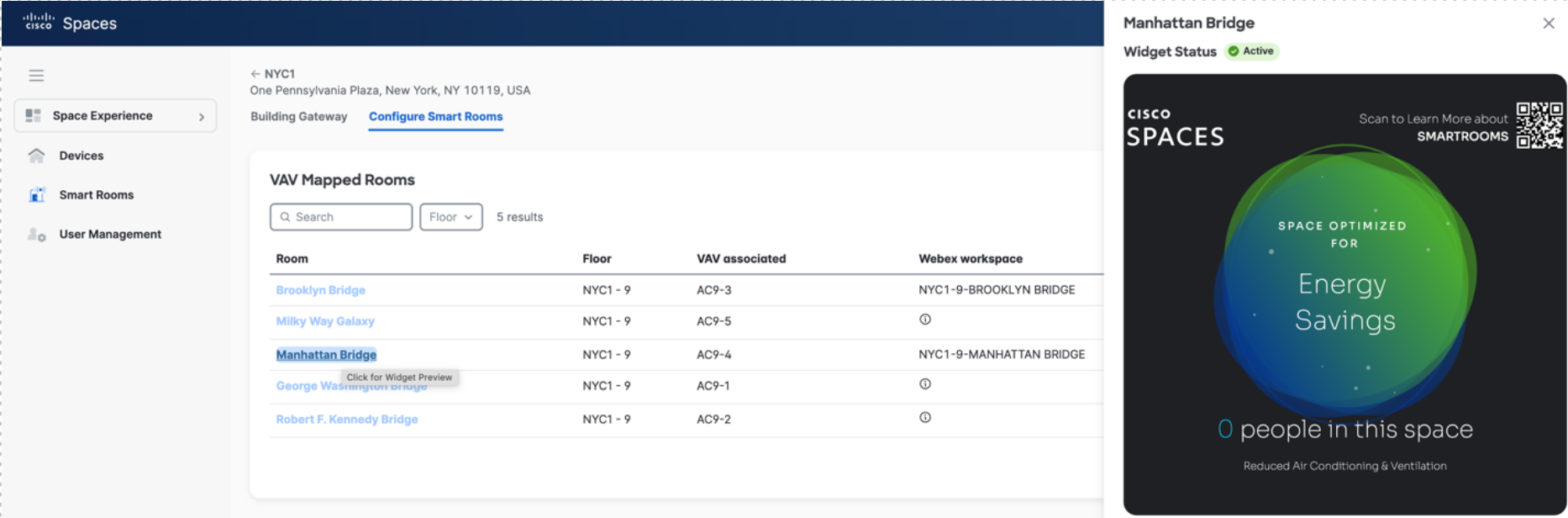
Cisco Smart Rooms seamlessly integrate your existing Cisco Collaboration devices with your Building Management System (BMS) to provide demand control ventilation, optimize the experience, wellbeing, and productivity of your existing spaces when in use, and reduce energy use when spaces are not in use.
Smart Room Booking
Enable employees to find and reserve available meeting rooms, reducing scheduling friction and improving workplace experience.
Occupancy-Based Room Management
Detect whether rooms are occupied and identify no-shows, helping reclaim unused meeting spaces.
Room Utilization Analytics
Understand which meeting rooms are underused or overcrowded to optimize space allocation and real estate investments.
Intelligent Room Controls
Automate lighting, temperature, and other connected room settings based on occupancy to improve comfort and energy efficiency.
Seamless Hybrid Collaboration
Bring together room availability, collaboration technology, and workplace insights for smoother in-person and hybrid meetings.
Proactive Room Maintenance
Surface room usage patterns and connected-device health insights to help facilities and IT teams identify operational issues earlier.
Please follow the link below to find out about the different ways to get support for Cisco Spaces.
In addition to the Spaces OS installation, below are the more specific requirements for Smart Rooms.
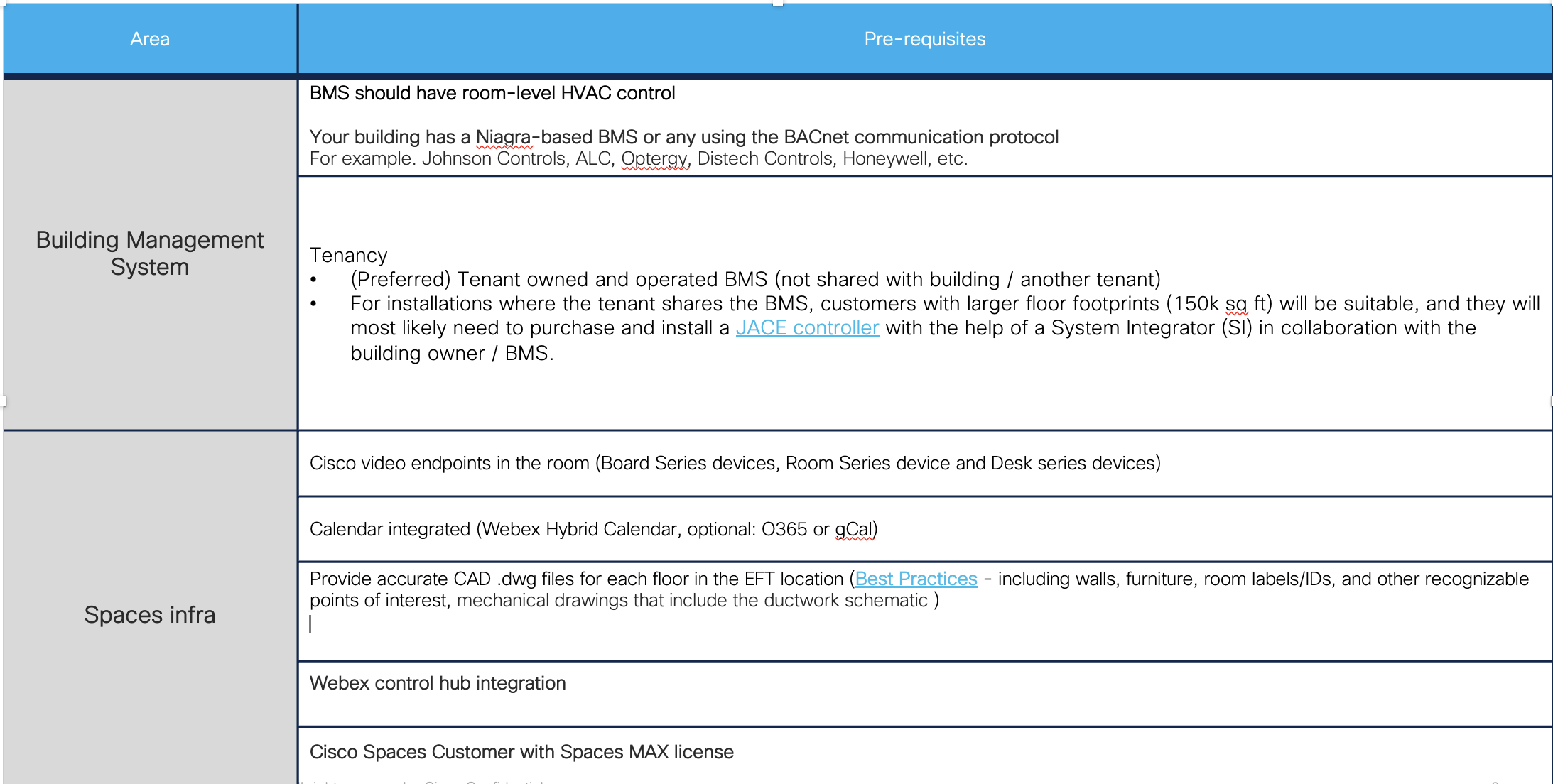
| Area | Pre-requisites |
|---|---|
| Building Management System |
BMS should have room-level HVAC control.
Your building has a Niagara-based BMS or any using the BACnet communication protocol.
|
|
Tenancy
|
|
| Spaces infra | Cisco video endpoints in the room (Board Series devices, Room Series devices, and Desk Series devices). |
| Calendar integrated (Webex Hybrid Calendar, optional: O365 or gCal). | |
| Provide accurate CAD .dwg files for each floor in the EFT location, including walls, furniture, room labels/IDs, other recognizable points of interest, and mechanical drawings that include the ductwork schematic. | |
| Webex Control Hub integration. | |
| Cisco Spaces Customer with Spaces MAX license. |
Prior to site survey, a pre-deployment requirements sheet should be sent to the customer. This lists all the assets and information required for a successful deployment.
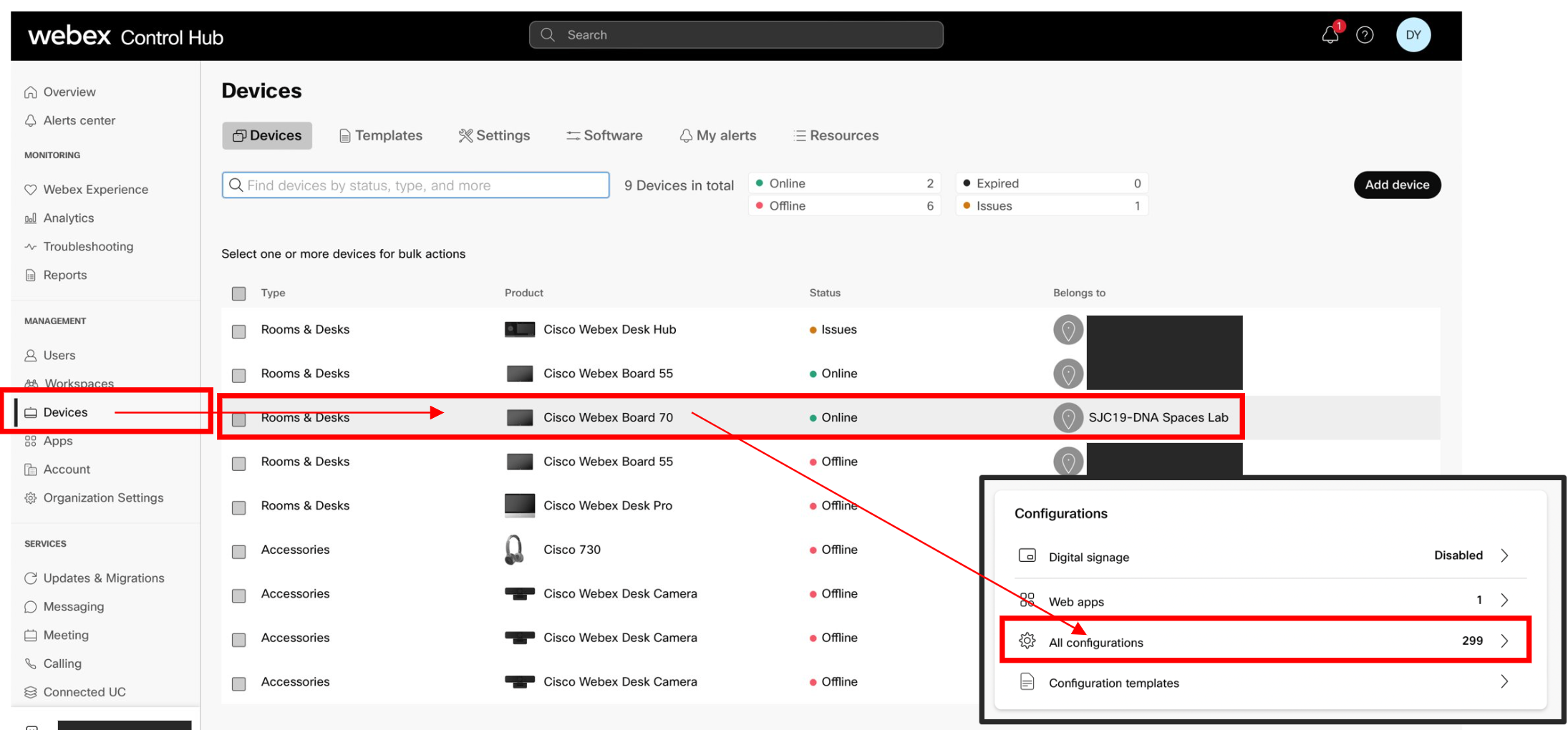
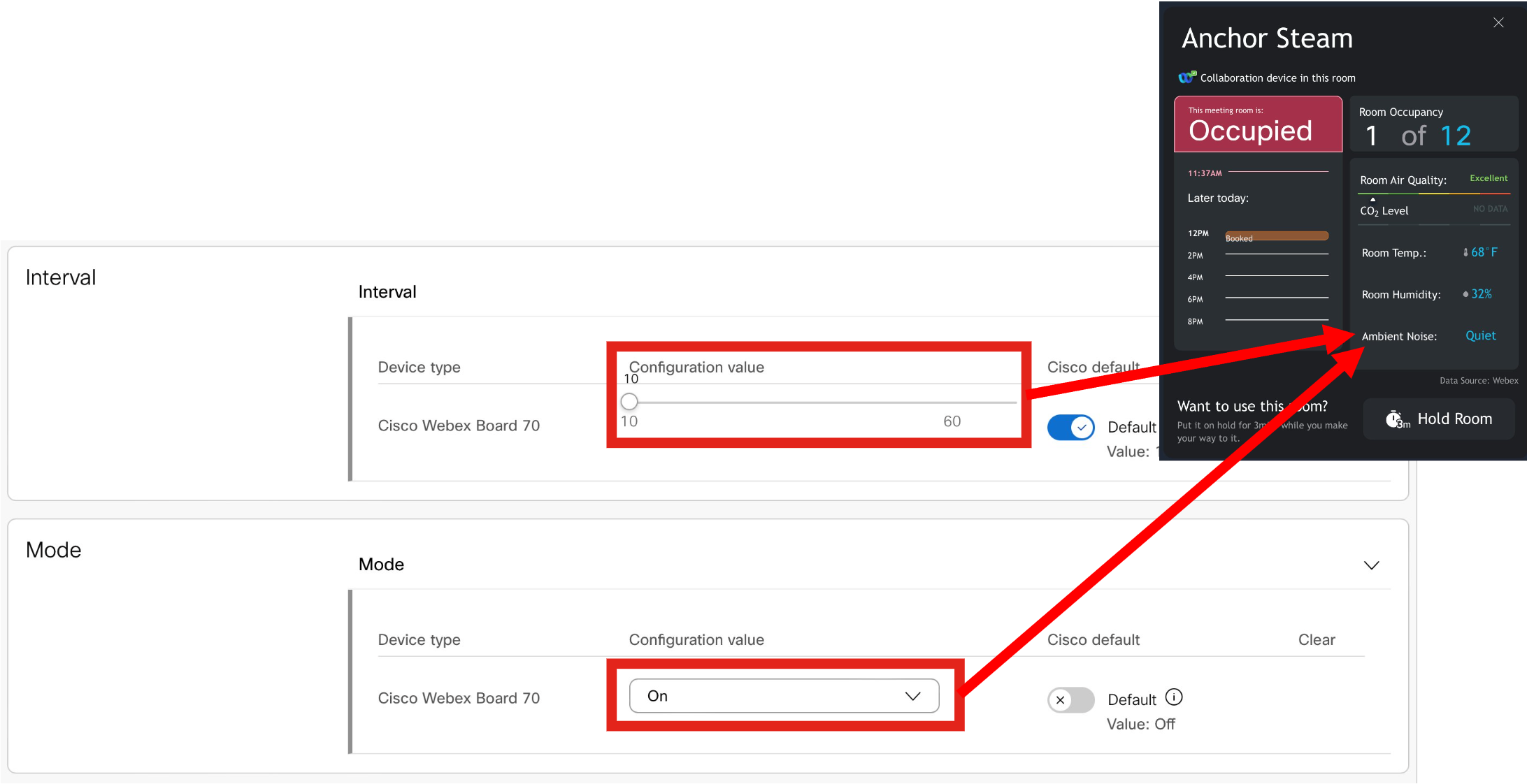
This section will illustrate how to configure the metrics in Control Hub.
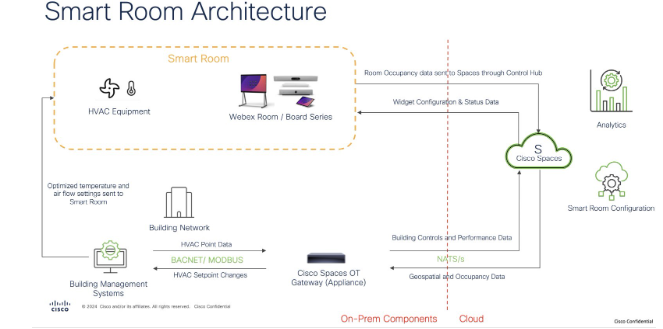
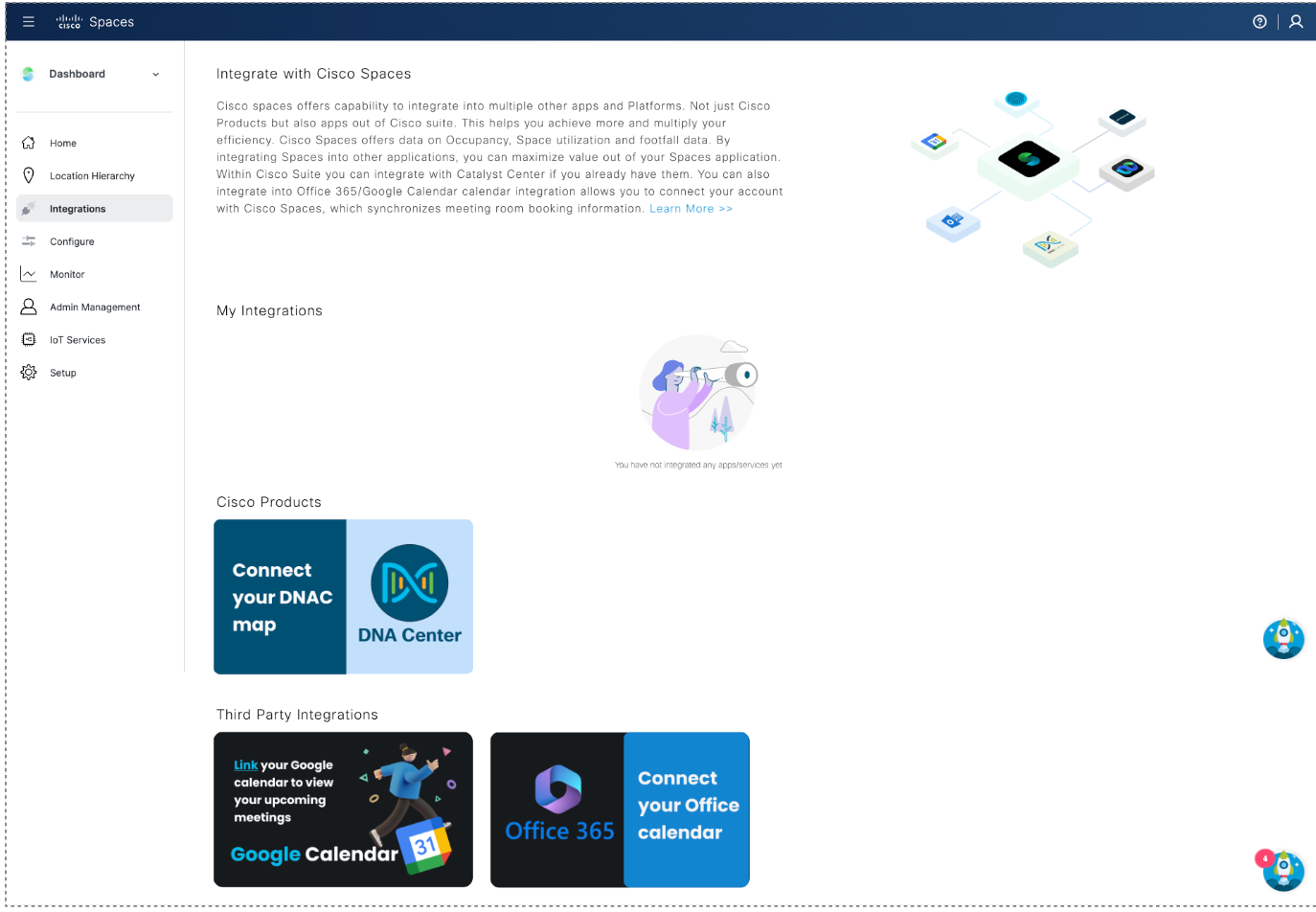
O365 and Google Calendar options are in Webex Control Hub under: Workspaces (page) > click on a Workspace > Scheduling (tab) > Calendar (option).
Deployment guide for Hybrid Calendar
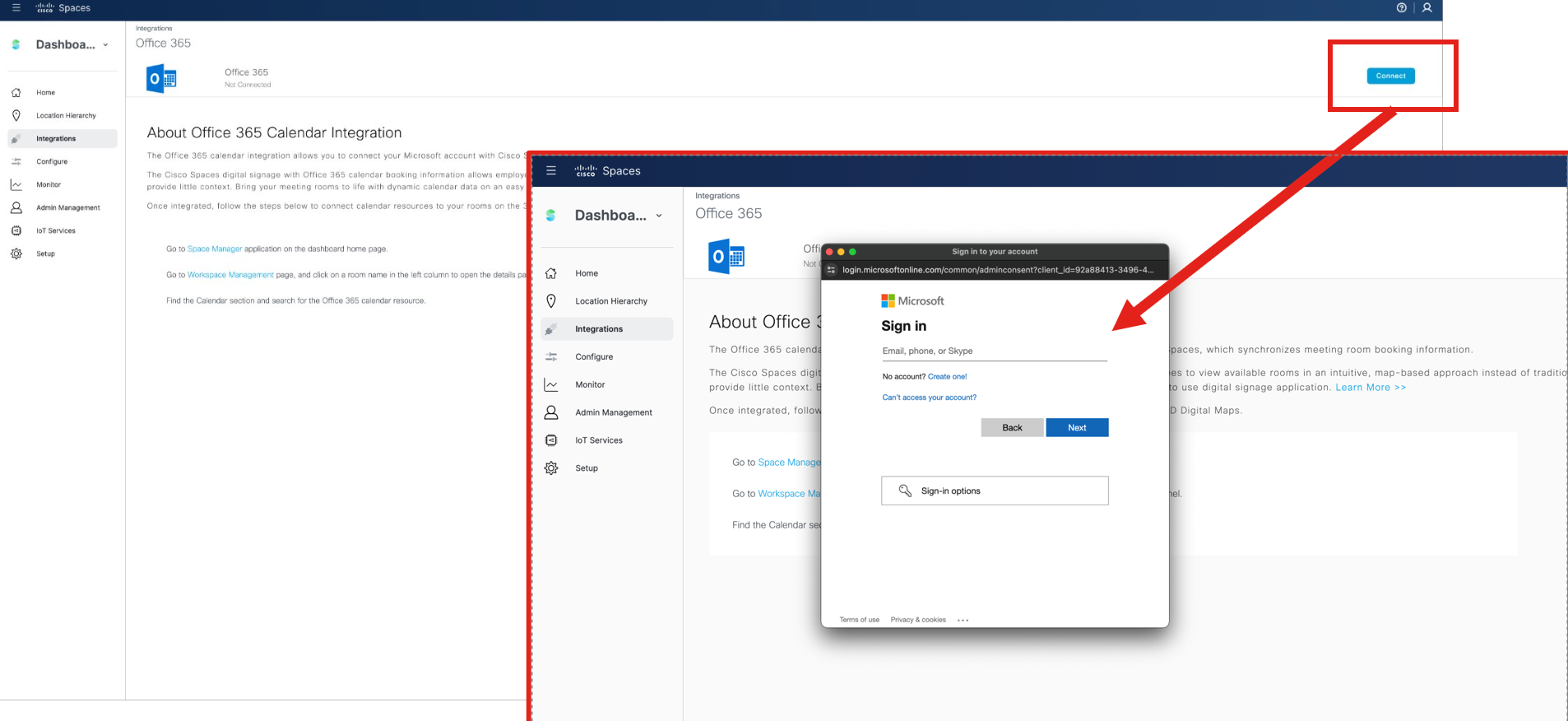
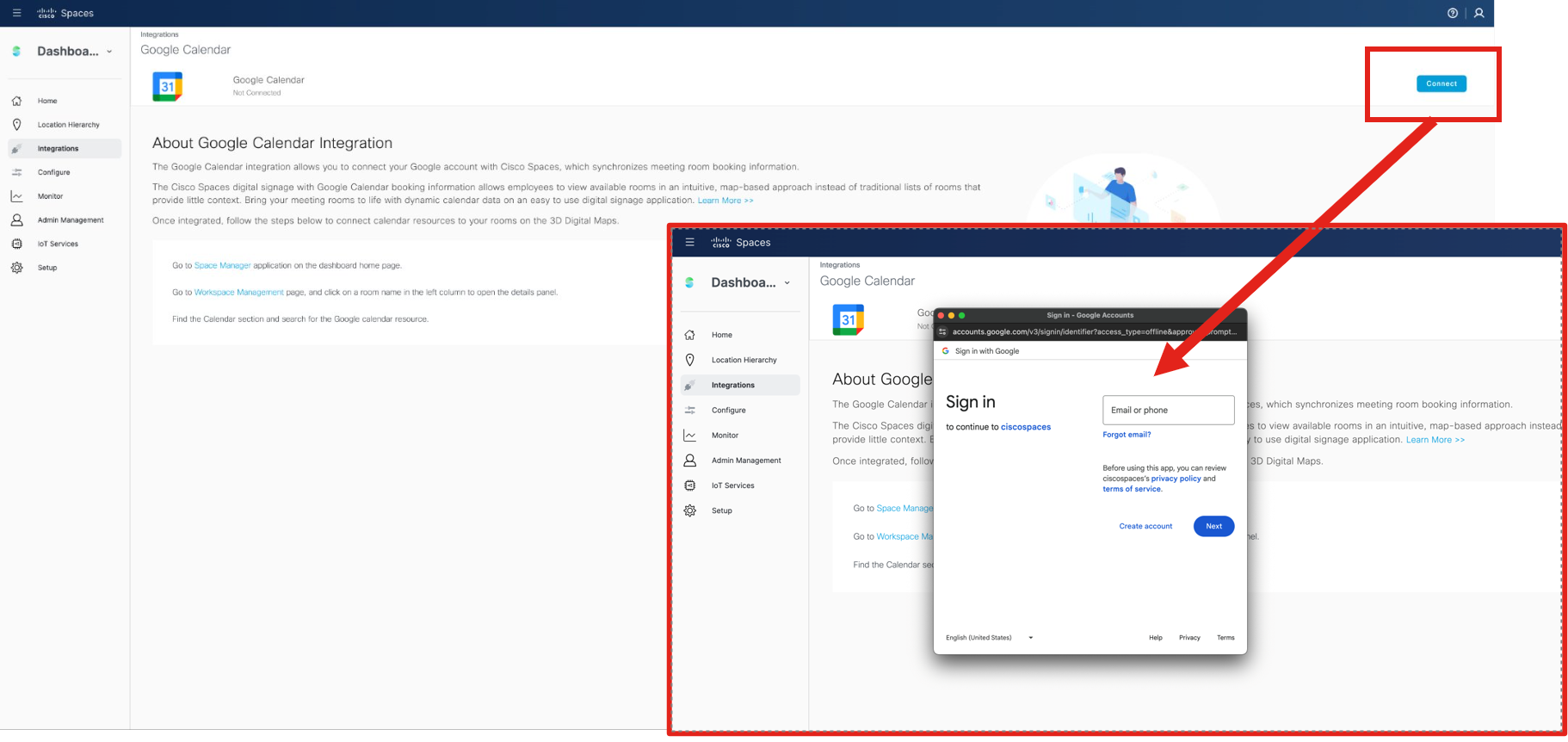
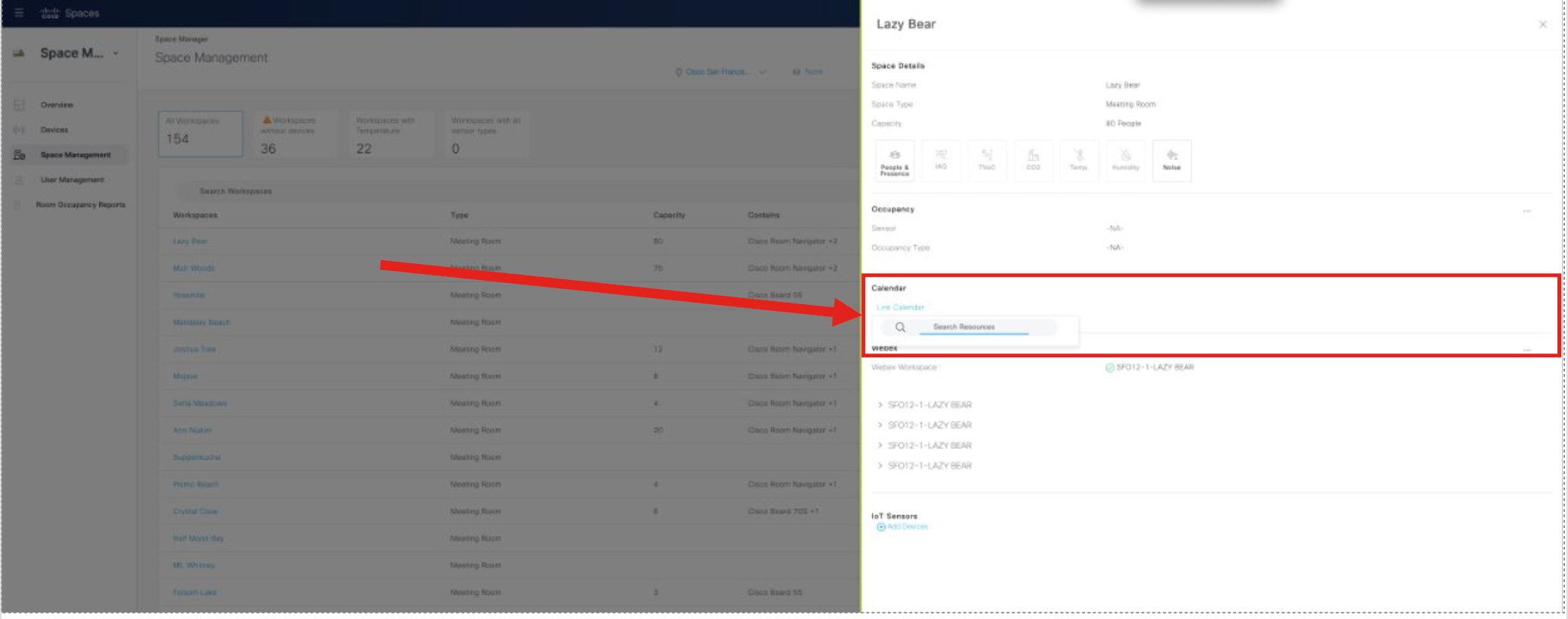
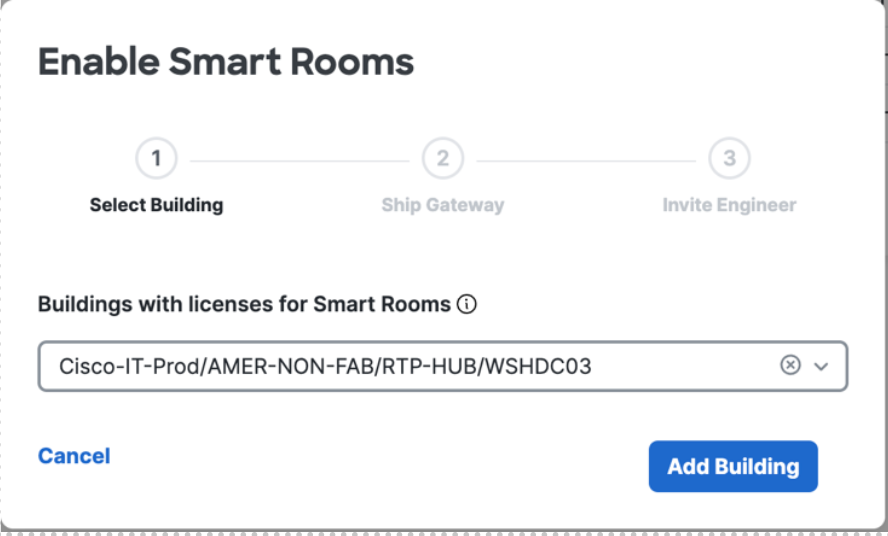
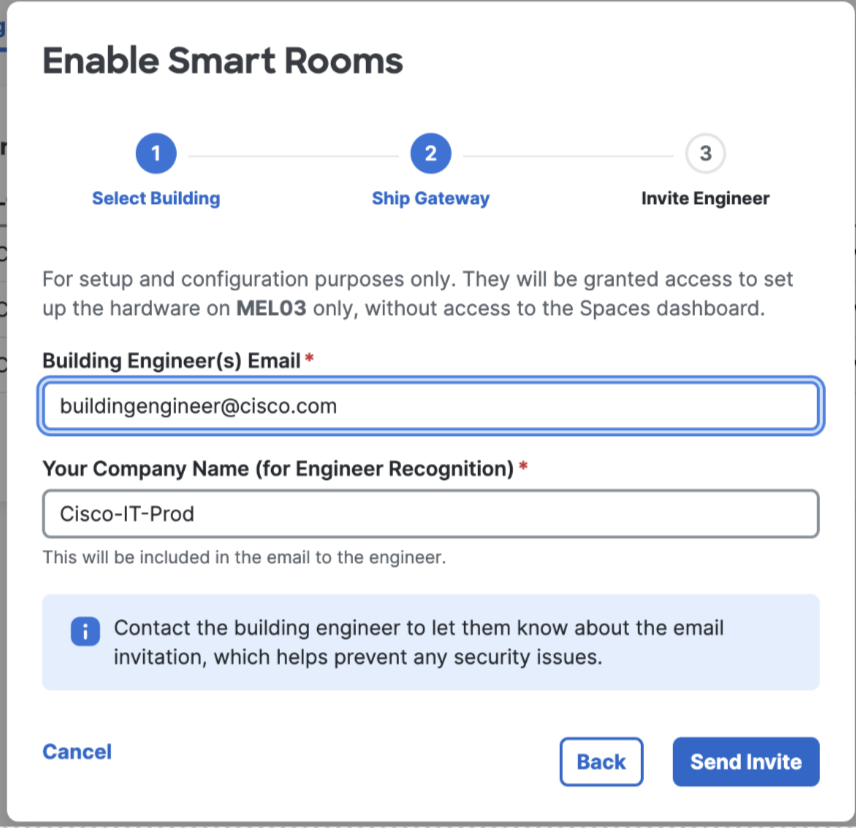
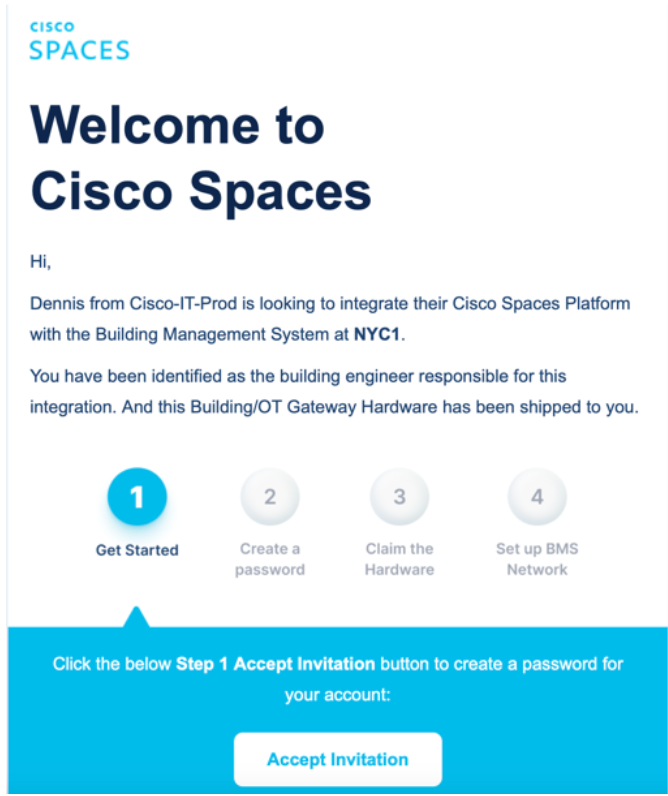
The Smart Rooms deployment team will work with building engineer of the organization to get the answers to the questions below for the gateway onboarding.
| No. | BMS Gateway Onboarding Questions |
|---|---|
| 1 |
How will we communicate with the BMS? There are two options:
-or-
|
| 2 | If option 1) (read/write) what priority should we write at? |
| 3 | In order to prevent conflicts, what IP address and BACnet ID can be assigned to the Spaces Smart Room Gateway? |
| 4 | Is there a VLAN? |
| 5 | Do you use a BBMD? |
| 6 | What BMS do you use? |
| 7 | How old is your BMS? |
| 8 | Can you expose all BACnet equipment or do you need to limit exposure with a JACE or similar Niagra 4 device? Limiting devices may be required if the building has multiple tenants, for example. |
| 9 | Do you have a JACE or other Niagra 4 device in place currently? |
| 10 | What network is your BMS on? (Landlord’s/base building, Cisco, or something else?) |
| 11 |
Who supports/manages the BMS?
Please provide a Point of Contact name, and contact information. |
| 12 | What mechanisms are in place for room by room HVAC? (VAVs, fan coils, chilled beam, etc…) |
| 13 | Can your BACnet instance support a polling frequency of once per minute/device? If not, what polling frequency can your instance support? |
| 14 | Do you have any issues with the existing BMS, for example: latency, controllers offline or frequently unreachable, etc…? |
As part of the EFT and initial onboarding process, it is best to perform a site survey to validate the space can support Smart Rooms technology. Preferably this would be done remotely with the on-site building engineer. During the site survey all the rooms should be visited to confirm they have dedicated ventilation, they are closed spaces (no half walls), and that they have dedicated ducts (no underfloor shared plenum). Additionally during the site survey the cabinet for the Spaces Building Gateway should be identified and validate if the necessary connections and power are available.
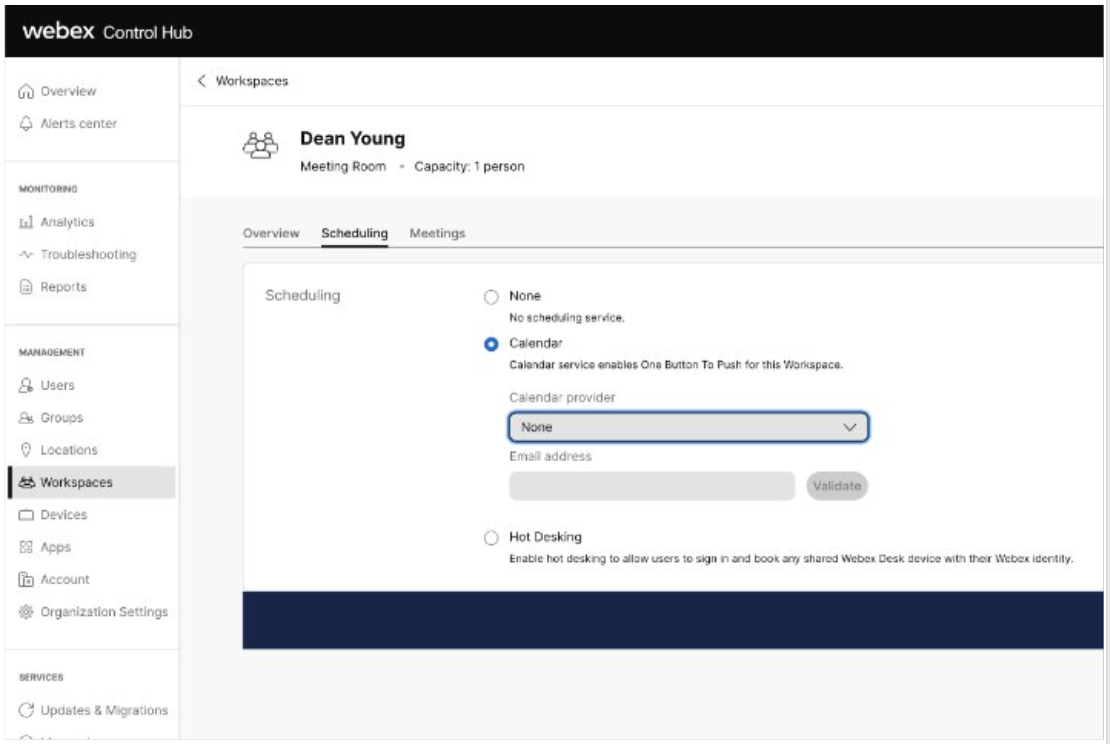
The Cisco Smart Rooms gateway connects to the building or OT network to communicate directly with the building management system (BMS) and endpoint controllers (e.g. VAVs and thermostats). The gateway receives occupancy and IAQ sensor telemetry data from the cloud, processes that data at the edge along with data coming from the BMS, and sets BACnet setpoints or makes available read-only BACnet points to the BMS network for control (see BACnet Integration below for more detail).
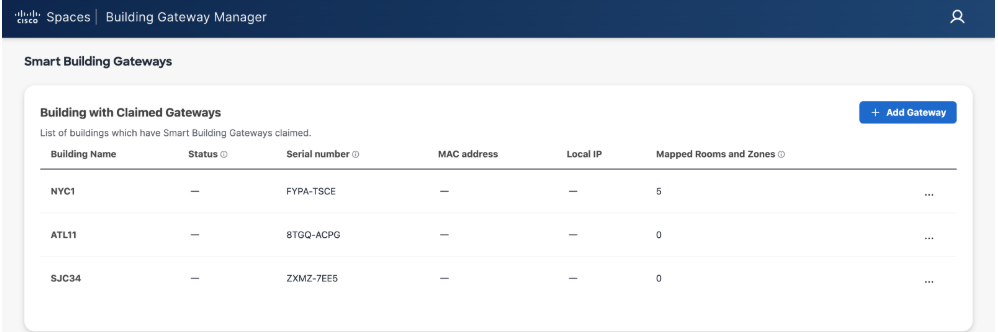
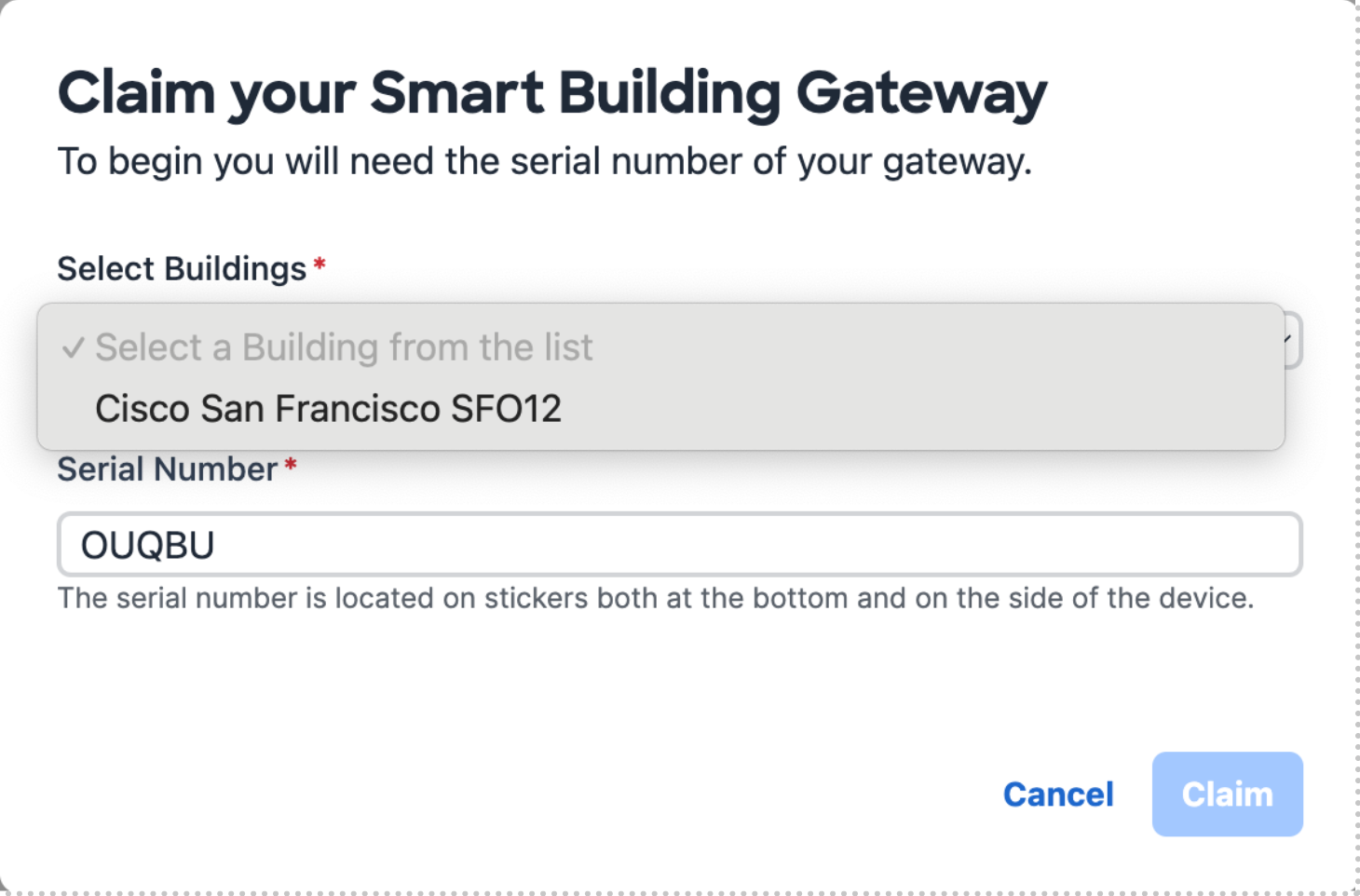
The Cisco Spaces Building Gateway is a cloud-based platform that securely connects on-premises building management systems (BMS) to the Cisco Spaces cloud to enable the Cisco Spaces Smart Rooms solution.
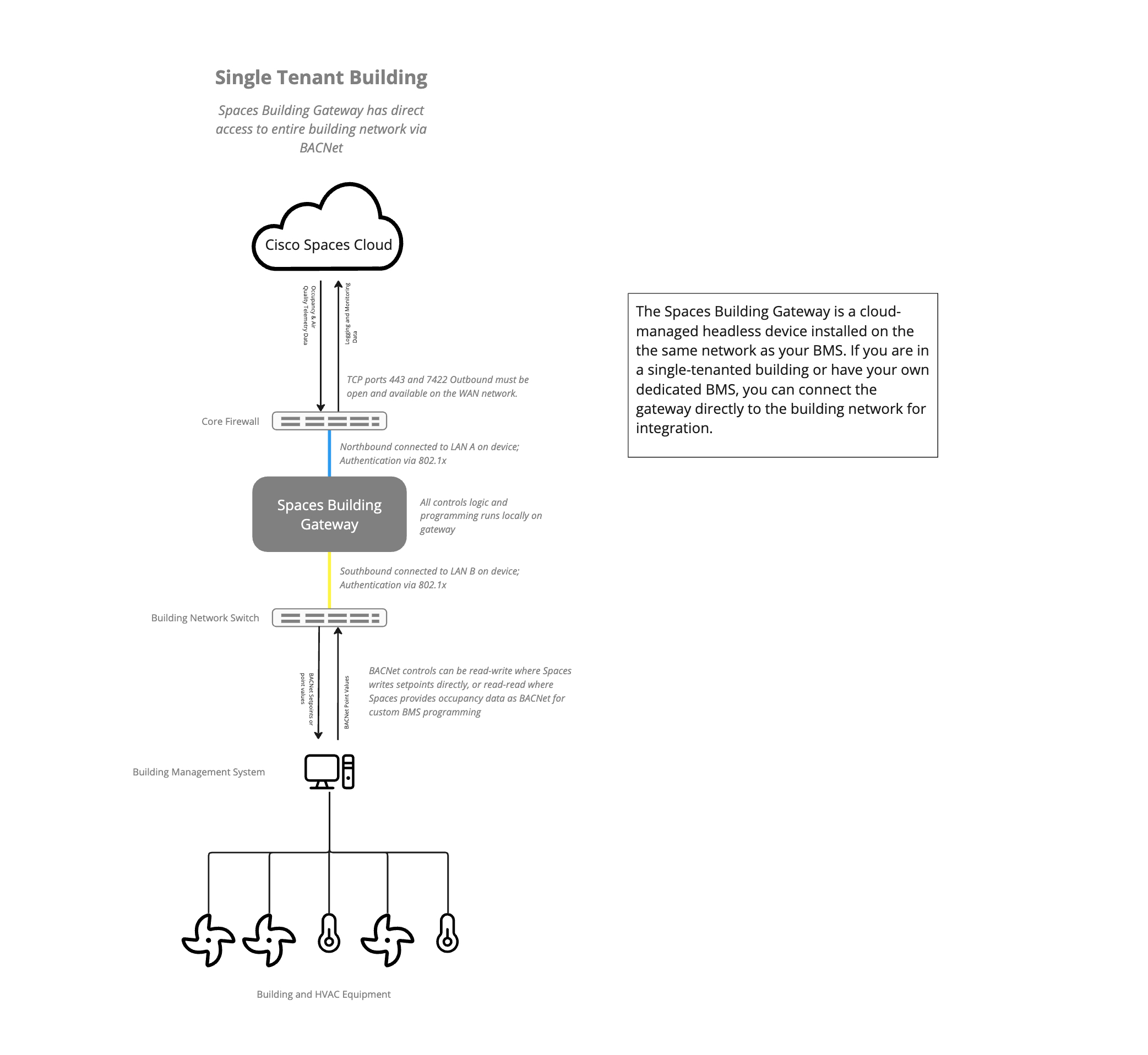
For deployments there are two recommended reference architectures:
Single Tenant: If you are in a single-tenanted building or have your own dedicated BMS and building network, you can connect the gateway directly to the building network for integration.
Multi Tenant: If you are in a multi-tenanted building and your BMS and building network are shared by multiple tenants, your landlord or the operator of the building network will likely want to put in a JACE controller as middleware. This JACE controller will limit access to the network, allowing read and write to only the data points associated with your space and restrict access to data points that would impact the operations of other tenants’ spaces.
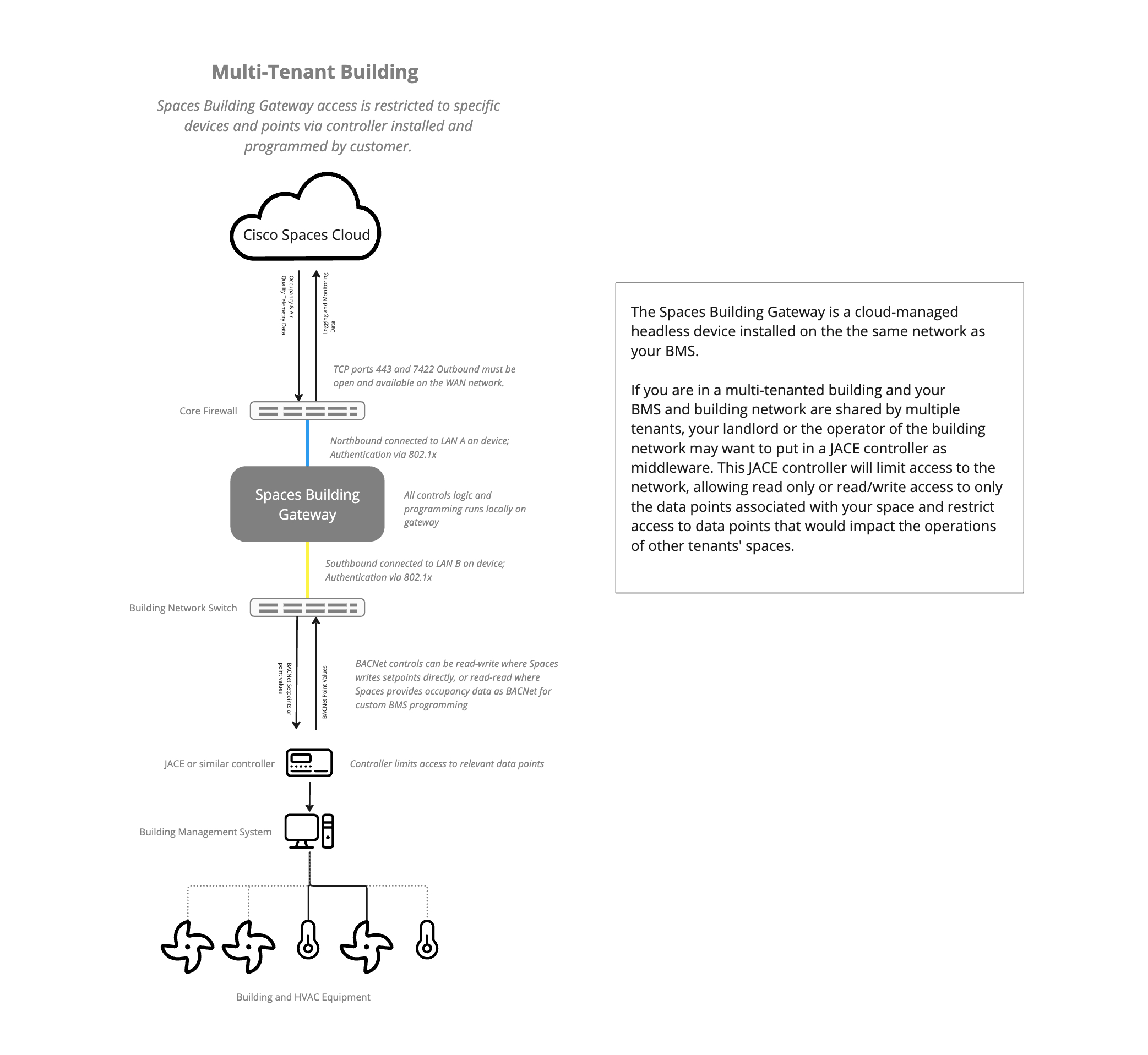
If the deployment is in a multi-tenant building or the building owner does not want to allow access to all BACnet devices in the site, a JACE or similar Niagara 4 controller needs to be installed by the customer. This must be done with their system integrator. Share the list of BACnet points above with the system integrator to ensure they are exposed. The JACE device is a pre-requisite for future steps.
The Smart Rooms gateway requires: 1) a connection to the internet (WAN) with TCP port 443 and port 7422 outbound available, and 2) an IP connection to the building network (LAN) with the appropriate BACnet port (typically 47808, but may vary depending on the customer) open for both inbound and outbound.
Connections on WAN and LAN can be via static IP or DHCP. Authentication to the WAN and LAN can be configured via 802.1x authentication for additional security.
| Region | IP Address |
|---|---|
| North America | 44.202.124.117 |
For static WAN configuration, please have the following information ready:
The LAN interface needs to be connected on the same switch where the BMS server is connected and authenticated via MAB. The Cisco Spaces Building Gateway needs a reserved IP address in DHCP.
For multi-tenant installation: If there is a JACE box that has tenant BACnet points mapped as a tenant BMS gateway, connect the network port of the JACE to the LAN interface of the Building Gateway (LAN B) and configure the static IP using the Building Gateway cloud console.
For LAN configuration, please have the following information ready:
In order to configure the BMS Edge Service you will need the following:
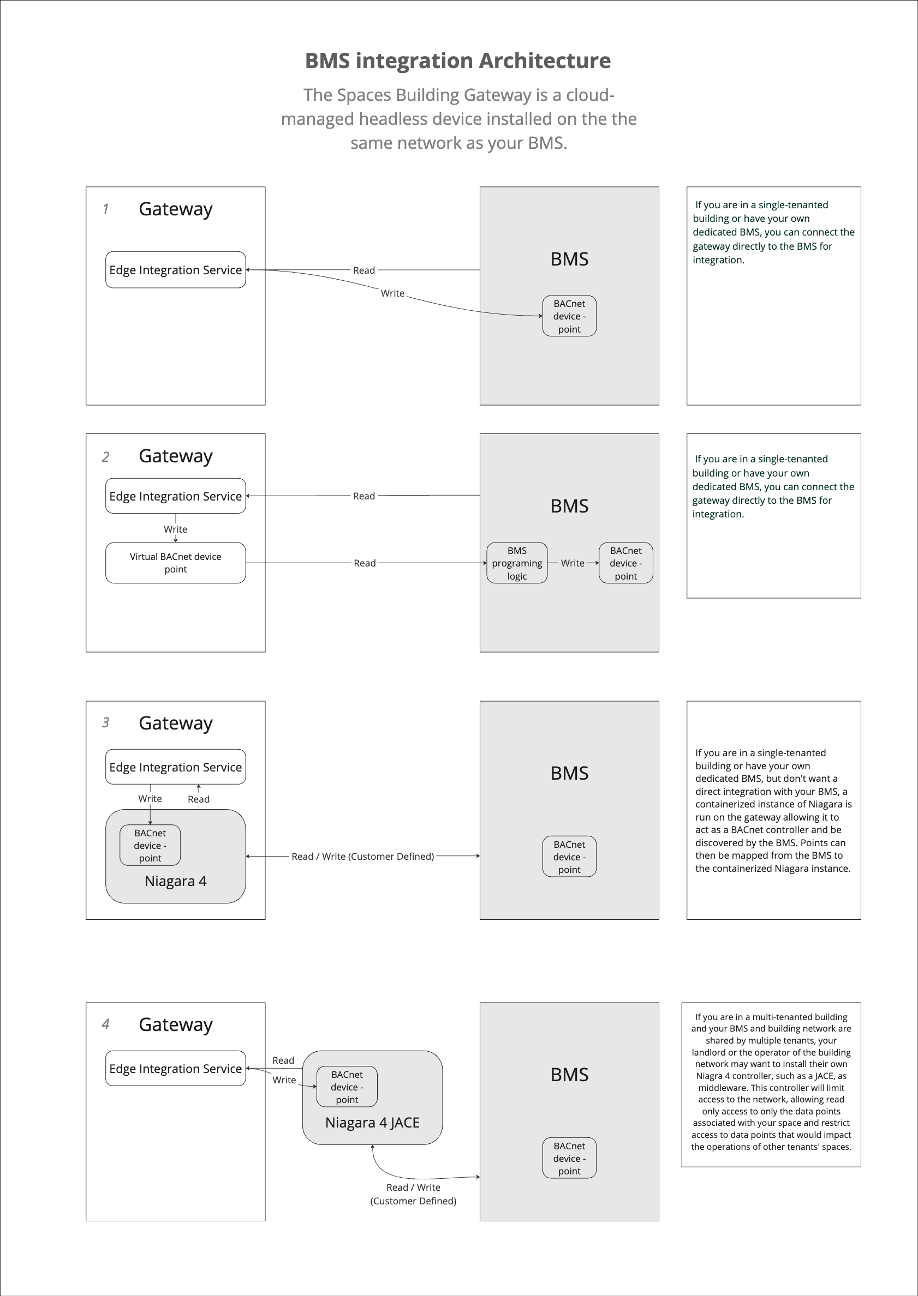
Cisco Smart Rooms control heating and cooling by adjusting setpoints on HVAC devices via BACnet. There are two approaches to BACnet integration: either read-write or read-read.
Read-write:
The Cisco Smart Rooms system can read temperature and flow BACnet points from the BMS, and combine that data with information from Cisco Spaces regarding occupancy and room schedules, and make direct changes (write) to the HVAC systems by writing heating and cooling setpoints directly to the BMS. The priority is configurable.
Read-read:
The Cisco Smart Rooms system can make occupancy and scheduling data available by writing to a pseudo BACnet device which your BMS reads and actions on based on your own rules and logic. The customer’s system integrator will need to perform additional programming in this case.
For integration the customer needs to make BACnet data points available to the Cisco Spaces Building Gateway.
| Point | Equipment Type | Abbreviation | Typical Value | Writable Point |
|---|---|---|---|---|
| Schedule | VAV | SCHED | 0 or 1 | X |
| Space Temp | VAV | ST | Varies | |
| Occupied Cooling Setpoint | VAV | OCSP | 73°F | X |
| Unoccupied Cooling Setpoint | VAV | UNOCSP | 85°F | X |
| Occupied Heating Setpoint | VAV | OHSP | 71°F | X |
| Unoccupied Heating Setpoint | VAV | UNOHSP | 55°F | X |
| Max Air Flow Setpoint | VAV | MAXFSP | Varies | X |
| Min Air Flow Setpoint | VAV | MINFSP | Varies | X |
| Space CO2 | VAV | CO2 | Varies | |
| Air Flow | VAV | FLOW | Varies | |
| Damper Position | VAV | DMPR | Varies | |
| Demand Shed Control | VAV | SHED | Varies | |
| VFD Fan Speed | AHU | VFDSPD | Varies |

Testing & Validation – depends on the number of VAVs mapped, from minutes to days. Testing the initial connection to see if the BMS is reading each change takes only a few seconds per VAV, always performed sequentially, testing if the VAV is mapped to the correct room takes up to several minutes per test to ensure the atmosphere in the room changes as expected, always performed sequentially.)
Benchmarking – at least 1 week; 2-3 weeks recommended. . (This is the process of capturing data BEFORE we begin optimizing so we can provide an accurate optimization report.)
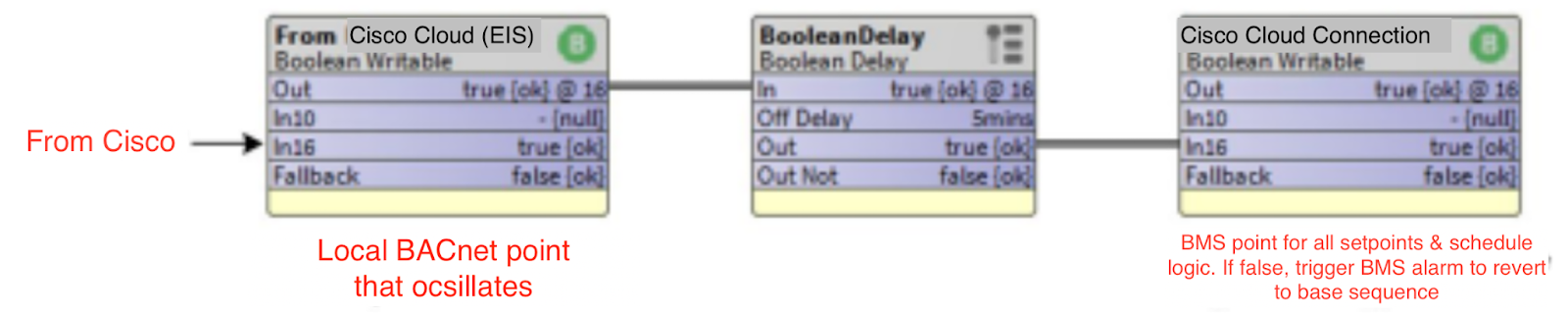
The constant monitoring of connection between the Smart Rooms gateway and BMS is critical when commands are received from the Cisco gateway to the BMS. If connection is lost from the Spaces Gateway, the BMS must revert to default programming. To accomplish this, a heartbeat connection point will be discovered from the Spaces gateway and trended on the BMS to monitor. This is accomplished by the following:
We use your existing Webex collaboration devices, such as the Webex Room bar, as an occupancy sensor by utilizing the person detecting ability native to the Webex cameras.
That occupancy data is pulled down from the Cisco Spaces Cloud to the Cisco Spaces OT gateway which connects to your BMS network as a BACnet device. The OT gateway is the only new hardware needed if you already have Webex collaboration devices installed. When the BMS is operational, and a space is unoccupied, we set back the heating or cooling point for that space to cut down unnecessary heating or cooling. When the space becomes occupied or is about to be occupied (if integrated with your meeting calendar) the set-back is released and the BMS returns the space to an optimal temperature. We continue to monitor temperate while the space is occupied to ensure optimal conditions are maintained.For the VAV Setback and Preconditioning sequence changes only the OCSP & OHSP points will be written to. It’s important to note that the heating setpoint should never be greater than the cooling setpoint and should always be at a minimum of 1°F less than the cooling setpoint.
The Schedule point is an important point that is used to indicate that the Air Handler that serves the VAV box is on or off. If the Schedule point is reading zero it indicates that air is not available for the VAV box resulting in no available cooling.When the room is not scheduled the VAV occupied setpoints will be adjusted to reduce the cooling or heating demand of the room. The room will still be conditioned just at different setpoints when not scheduled. The sequence will perform as follows:
When:Prior to a Cisco Room Scheduled event Preconditioning is used to have the room at default occupied setpoints at the start of a meeting. It’s important to understand how long it takes a room to recover from a setback state to an occupied state. For example its important to know the average time for the space temperature to decrease or increase by 1°F. For example if it takes 5 minutes for a space to drop 1°F and we are transitioning from a space temperature of 76°F to a setpoint of 73°F the room should be taken out of Setback 15 minutes prior to the Cisco Rooms scheduled event start time. The same logic will be used for heat recovery. For this sequence we will call these points as follows.
Cool Recovery Time (CRT) = Average minutes it takes to lower the temperature 1°F Heat Recovery Time (HRT) = Average minutes it takes to raise the temperature 1°F The Preconditioning SOO shall be as follows: When Preconditioning CoolingThe system is designed for resiliency. All control programming runs on the edge device, and not in the cloud. If requested the system can be deployed in High-availability configuration if the customer opts for the premium package.
The gateway, WAN and LAN connectivity, and individual Webex devices are all monitored as part of the managed service. Cisco’s support teams will proactively address any issues, if they cannot be resolved by the support team or necessary changes will impact the customers systems, the customer will be notified of the issue and steps to be taken for resolution. If disruption in connectivity will significantly impact performance of the system the team may disable the Smart Rooms functionality until it is resolved, allowing the building’s default programming to fully assume control. If there is a failure in connectivity or the gateway, the following behaviors ensure a safe degradation of functionality:If Webex cameras or devices in the room lose connectivity, there will be no occupancy data coming from the room. In this event the gateway will release any programming and set all setpoints back to the default building programming. Once connectivity resumes the application will resume proactive conditioning.
If there is no connection to the internet the local gateway will not receive occupancy data or calendar data for setbacks and preconditioning. In this event the gateway will release any programming and set all setpoints back to the default building programming. Once connectivity resumes the application will resume proactive conditioning.
If there is a hardware failure the support team will be immediately alerted and can alert the customer to take action. The latest setpoint changes will remain in place. Once the hardware comes back online it will resume adjusting setpoints. If the device remains offline, depending on the BMS the setpoints will eventually be overridden by the existing programming of the BMS.
The constant monitoring of connection between the Smart Rooms gateway and BMS is critical when commands are received from the Cisco gateway to the BMS. If connection is lost from the Spaces Gateway, the BMS must revert to default programming. To accomplish this, a heartbeat connection point will be discovered from the Spaces gateway and trended on the BMS to monitor.
This is accomplished by the following: