Migrate Spaces Connector 2.x to Connector 3 Click here >>
Your mission dossier has landed. Briefing starts on Nov 5. Sign up for the Fall Digital Event
Welcome to Cisco Spaces Setup Guide
A companion app to setup and drive business outcomes with Cisco Spaces
Get started with Cisco Spaces
Accept invitation, setup your password & log into your dashboard
Onboard your network
Connect your Catalyst or Meraki network to Cisco Spaces cloud.
Setup your locations
Organize your locations and update your metadata
Setup & start using apps
Learn how to setup & use all the apps on your dashboard
Drive End User Adoption
Help employees and visitors discover, adopt, and get the most value from your Cisco Spaces deployment
Cisco Spaces is a cloud platform that turns Cisco networking and collaboration devices into sensors, helping organizations create better experiences, optimize operations, drive data-backed decisions, and have AI-ready data for enterprise automations.
Using location, occupancy, environmental, and device data from existing infrastructure, it powers outcomes such as indoor navigation, room and desk booking, asset tracking, occupancy analytics, staff safety, infant monitoring, energy efficiency, and more, all without the cost and complexity of overlay infrastructure or disconnected point solutions.
Cisco Spaces also helps teams validate network design before deployment, so smart space outcomes work correctly from day one. This avoids costly retrofits and redesigns, reduces deployment complexity, and scales easily as new sites and outcomes are added, maximizing the long-term value of Cisco network investments across the organization.
To know more, visit Cisco Spaces
Cisco Spaces offers three flexible tiers that help you build on your Cisco infrastructure, from foundational location visibility to advanced smart space experiences. Start with what you need today and expand as your business requirements grow.
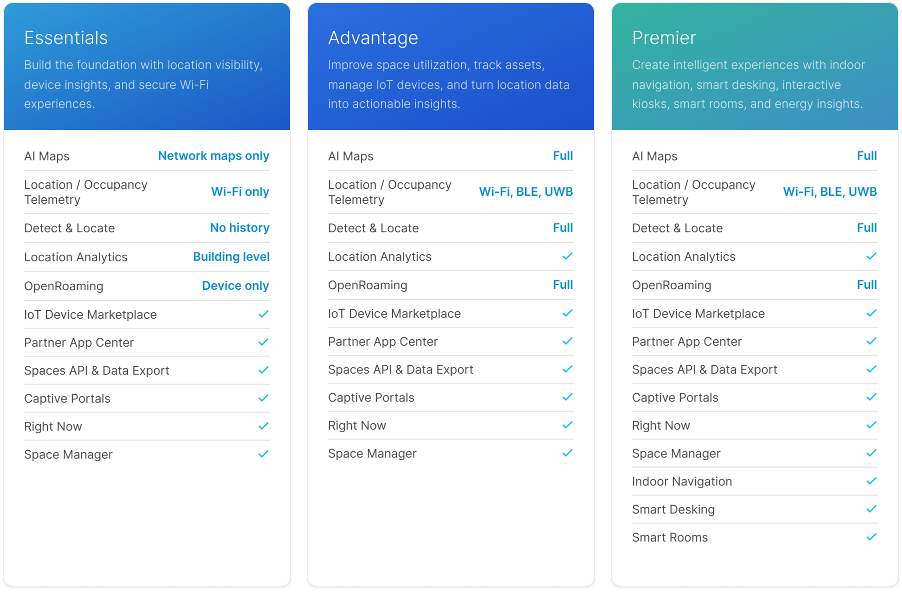
Learn more about Cisco Spaces Packages and Licensing here
Not sure what licenses you have? Check here
Explore Cisco Spaces Apps
You can activate & start using Cisco Spaces in 4 simple steps. The setup
takes about 30-40 minutes and has no impact on your existing network setup.
Before diving in, take a moment to go through the list of Activation Best Practices to help you get the most out of Cisco Spaces
Click the below ‘Get Started with Cisco Spaces’ to begin your setup.
