Far fewer know how those spaces are actually being used.
Most organizations know how many desks, rooms, and floors they have.
Which floors fill up first? Are meeting rooms being booked but left empty? Do employees struggle to find available desks? Are you paying for space that is rarely used?
In our recent Cisco Spaces Learning Series session, “Know Your Workplace with Cisco Spaces Occupancy,” we discussed how occupancy data can help organizations better understand their buildings, optimize space, and make informed workplace decisions.
Missed the session? Watch the recording for a walkthrough of Cisco Spaces Occupancy, including deployment best practices, live dashboards, and practical use cases.
Here are some of the key topics we covered.
Your network may already know more than you think
Your Cisco network already connects people, devices, and buildings. With the right integrations, that infrastructure can also provide valuable occupancy data.
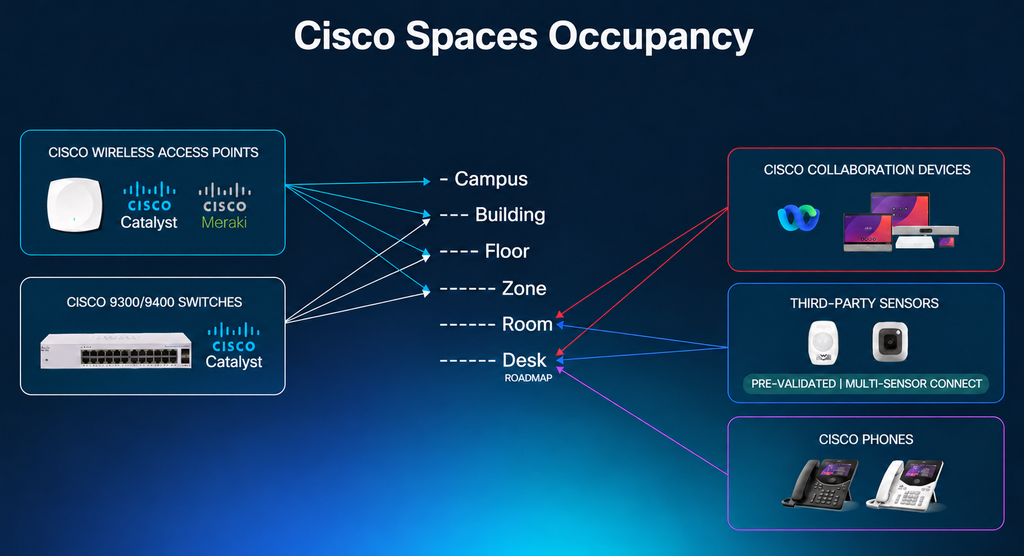
Cisco Spaces occupancy analytics use telemetry from sources such as Wi-Fi and collaboration endpoints to help you understand how many people are present, where they are, and how building usage changes throughout the day.
This gives IT and facilities teams visibility into occupancy across campuses, buildings, floors, zones, and rooms, without relying entirely on manual counts or periodic studies.
Start with what’s happening right now
One of the first questions facilities teams need to answer is simple: How many people are in the building right now?
Cisco Spaces Live Occupancy helps teams monitor current people counts and see how occupancy is distributed across locations. Views can be filtered by campus, building, floor, or zone to identify where activity is concentrated and where space may be underused.
Teams can use this information to:
- Identify heavily used floors or zones
- Understand building-level density
- Support safety and capacity planning
- Adjust services based on actual demand
- Track cumulative footfall throughout the day
Instead of relying on periodic reports, facilities and IT teams have access to more current information about how their buildings are being used.
Then look for patterns, not just snapshots
Real-time data shows what’s happening today. Historical data helps teams understand whether those patterns are typical.
With the Cisco Spaces Space Utilization app, teams can analyze occupancy trends across buildings, floors, and rooms to understand how spaces are used over time.
Comparing occupancy patterns can reveal peak usage periods, underutilized spaces, and opportunities to improve workplace planning. Room-level insights can also help identify meeting rooms that are frequently booked but remain unoccupied.
These insights can inform decisions around:
- The mix of individual and collaborative spaces
- Floor and room capacity
- Desk and meeting room utilization
- Future workplace planning
- Space allocation and consolidation
- Building services and operational efficiency
Occupancy data can also be used beyond Cisco Spaces. Through APIs and data exports, organizations can bring occupancy information into their own reporting tools, analytics platforms, and business systems to support broader workplace and real estate planning.
From device counts to reliable occupancy insights
Accurate occupancy monitoring depends on the quality of the underlying data.
People often carry multiple devices, while printers, cameras, scanners, and sensors may also appear on the network. Counting every connected device as a person would produce misleading results.
Data standardization and normalization play an important role here.
Cisco Spaces uses data filtering, identity-based counting, and location context to help translate network and device telemetry into meaningful occupancy information. Deployment best practices include configuring authentication methods, excluding non-personal devices, and defining appropriate capacity and location parameters.
For collaboration spaces, Cisco Spaces can also use information from room devices to indicate whether meeting rooms are available or occupied.
These configurations help improve the reliability of people counts and make occupancy data more useful for comparing spaces and identifying trends.
From occupancy data to action
Occupancy monitoring becomes particularly useful when teams can apply what they’ve learned.
Facilities teams can adjust services based on building usage. Real estate teams can assess whether floors and buildings are being used effectively. IT teams can support these efforts by providing the underlying data and infrastructure. Operations teams can identify opportunities to reduce waste and improve building efficiency.
For organizations already using Cisco infrastructure, Cisco Spaces offers a way to use existing network data to understand their physical environments and support broader smart building initiatives.
Catch up on the Cisco Spaces Occupancy Learning Series
Our recent Learning Series session covered the practical side of occupancy monitoring, from deployment and configuration to interpreting data and applying it to workplace decisions.
The session includes:
- Occupancy use cases across buildings, floors, zones, and rooms
- Deployment best practices for Wi-Fi and collaboration environments
- Configuring Cisco Spaces for more accurate people counts
- Live Occupancy and Space Utilization dashboards
- Historical comparisons, trends, and data exports
- Customer examples and practical takeaways
Watch the session recording to see how Cisco Spaces can help you understand occupancy patterns and put that information to use.
Knowing how many people are in a building is a starting point. Understanding how they use the space can help you make better decisions about how that building operates.